
In today’s connected homes and modern offices, technology moves at breakneck speed. High-performance gaming rigs, multi-monitor standing desks, ultra-HD home theaters, and smart audio setups deliver incredible experiences—yet they all share a common enemy: wire chaos.
A spiderweb of dangling power cords, display cables, and ethernet lines creates visual pollution, traps dust, entangles feet, and invites curious pets to chew on dangerous high-voltage wires.
In 2026, the cleanest and most cost-effective secret to mastering home wire organization is utilizing flexible Cable Sleeves.
By bundling loose wires into a single, unified, aesthetically pleasing tube, deploying high-quality Cable Sleeves allows you to conceal messy cord bundles, protect delicate cables from physical damage, and instantly restore visual harmony to your workspace. This comprehensive guide covers sleeve materials, entry mechanisms, diameter selection, standing desk setups, and practical installation steps to help you eliminate wire clutter for good.
Under-Desk Trays: The Ultimate 2026 Guide to Flawless Cable Management
Table of Contents
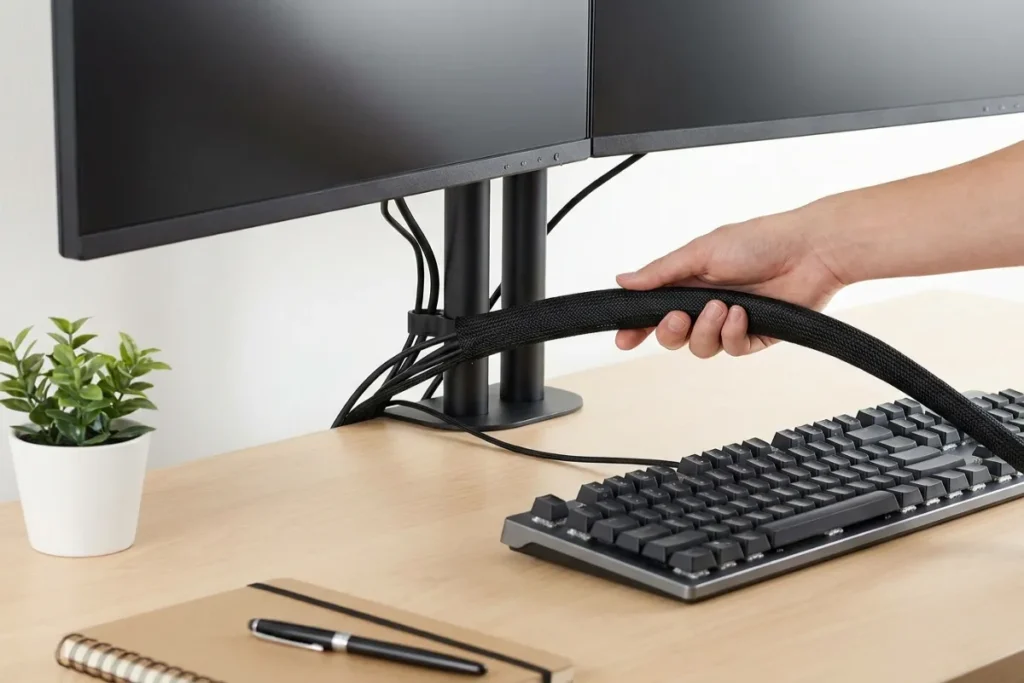
Why Cable Sleeves Are Essential for Modern Workspaces
Tangled cords do more than ruin the clean look of your desk. Leaving wires unmanaged causes constant friction that reduces productivity and can lead to hardware failure.
+-------------------------------------------------------------------------+
|                  EXPOSED CORDS VS. BUNDLED CABLE SLEEVES                |
|                                                                         |
|   EXPOSED WIRE CHAOS:                                                   |
|   - Individual cords dangling independently down walls and desk legs    |
|   - Dust and pet hair clinging to sticky plastic wire jackets           |
|   - Bending strain on ports during standing desk movements              |
|   - Visually distracting visual noise that elevates stress              |
|                                                                         |
|   UNIFIED CABLE SLEEVE MANAGEMENT:                                      |
|   - Multiple cords combined into a single, clean architectural run      |
|   - Smooth surface that repels dust and deters chewing pets             |
|   - Strain-relief protection for video and power connectors             |
|   - Streamlined, professional appearance that fosters deep focus        |
+-------------------------------------------------------------------------+
1. Strain Relief and Cable Longevity
When cables hang loosely from wall-mounted TVs or standing desks, their own weight pulls downward on monitor ports, graphics card connections, and wall outlets. Encasing cord bundles in a durable sleeve distributes weight evenly along the entire run, providing essential strain relief that prevents bent connector pins and costly cable replacements.
2. Pet and Children Safety
Cats, dogs, and young children are naturally drawn to loose, dangling cords. Chewing on live electrical lines presents serious risks of electric shock and fire. Heavy-duty woven or braided sleeves act as a protective barrier, preventing pets from biting through rubber insulation.
Material Breakdown: Choosing the Right Cable Sleeve
Selecting the right sleeve material depends on your environment, heat levels, and aesthetic goals.
+-------------------------------------------------------------------------+
|                    CORE CABLE SLEEVE MATERIAL TYPES                     |
|                                                                         |
|   [1. FLEXIBLE NEOPRENE]      [2. SPLIT BRAIDED PET]                    |
|   - Soft, stretchable rubber  - Expandable woven monofilament           |
|   - Zipper or Velcro closure  - Self-wrapping split design              |
|   - Ideal for frequent changes - Excellent heat dissipation             |
|                                                                         |
|   [3. SPIRAL POLYETHYLENE]    [4. SILICONE & RUBBER RUNNERS]            |
|   - Rigid spiral wrap tubing  - Ultra-flexible, smooth finish           |
|   - Breakouts at any point    - High flame and chemical resistance      |
+-------------------------------------------------------------------------+
1. Neoprene Zipper Sleeves
Made from synthetic rubber—the same material used in wetsuits—neoprene sleeves are flexible, durable, and soft to the touch. They typically feature heavy-duty zippers along their length, allowing you to bundle up to 8–10 cables quickly without disconnecting your electronics.
2. Split Braided PET (Polyethylene Terephthalate)
Split braided sleeves use a woven monofilament structure with an overlapping seam. They feature a natural spring-like curl that snaps around wire bundles automatically. Braided sleeves offer superior heat dissipation, making them ideal for high-powered gaming PCs and home theater receivers.
3. Spiral Wrap Tubing
Made from semi-rigid polyethylene, spiral wrap sleeves wind around cables like a spring. Their primary advantage is breakout flexibility: you can exit individual cords at any point along the sleeve length to plug into nearby devices.
Cable Sleeve Selection Matrix
Compare key performance metrics across different sleeve designs to find the best match for your setup:
| Sleeve Design | Material Construction | Closure Type | Cable Capacity | Best Application |
| Neoprene Zipper Sleeve | Synthetic Neoprene Rubber | Heavy-Duty Zipper | Large (6–10 cables) | TV drops, home office desks, frequent changes |
| Split Braided Wrap | Woven PET Monofilament | Self-Closing Overlap | Medium-Large (4–8 cables) | PC setups, high-heat environments, standing desks |
| Spiral Wrap Tubing | Polyethylene Plastic | Spiral Interlock | Small-Medium (2–5 cables) | Multi-device breakouts, industrial machinery |
| Velcro Neoprene Wrap | Flexible Neoprene | Full-Length Velcro | Adjustable (4–10 cables) | Custom bundle sizes, quick access installations |
Interactive Cable Sleeve Sizing Calculator
Calculate your bundle diameter and discover the exact sleeve type, width, and length needed for your office setup using our interactive tool below.
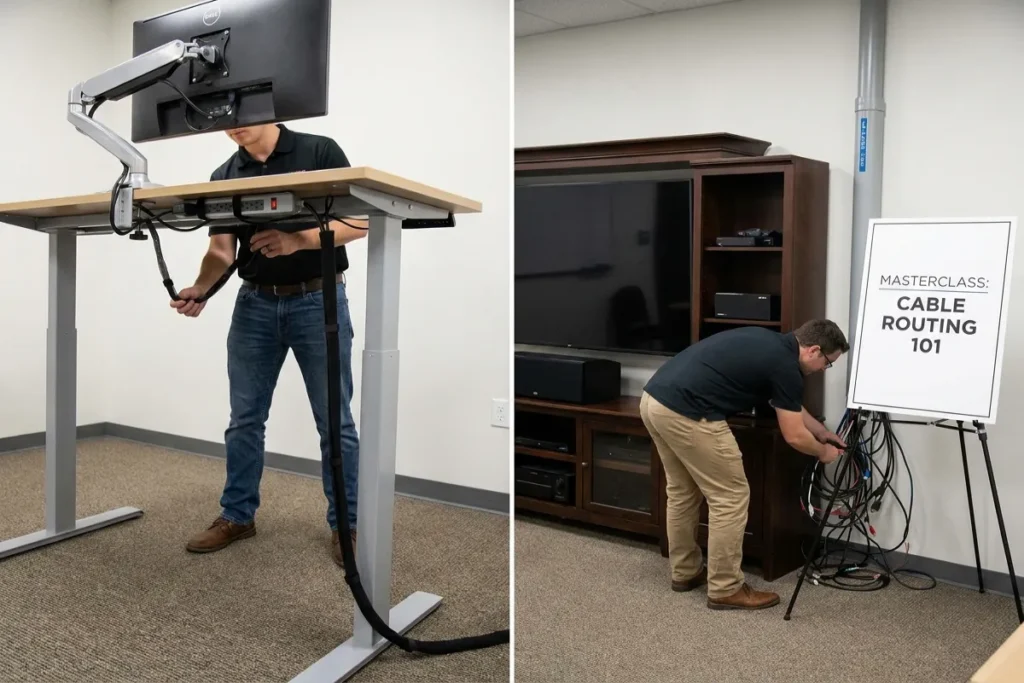
Masterclass: Routing Cables on Standing Desks and Home Theaters
Proper sleeve deployment ensures a clean layout that accommodates height adjustments without placing strain on connected gear.
+-------------------------------------------------------------------------+
|                  STANDING DESK SINGLE DROP ARCHITECTURE                 |
|                                                                         |
|   DESK UNDER-DECK:                                                      |
|   [ Monitor Cables ] + [ Desk Lamp ] + [ PC Power ]                     |
|            │                   │                 │                      |
|            └───────────────────┼─────────────────┘                      |
|                                ▼                                        |
|             =======================================                     |
|             [ CABLE SLEEVE BUNDLE DROP RUN ]                            |
|             =======================================                     |
|                                │                                        |
|                                ▼ (Curved Expansion Loop)                |
|                     [ WALL POWER & NETWORK OUTLETS ]                    |
+-------------------------------------------------------------------------+
1. The Single Drop Technique for Standing Desks
The golden rule of standing desk cable management is the Single Drop.
Instead of letting multiple cords dangle from your monitor dock, PC tower, and desk lamp, collect every wire into an under-desk tray or power strip. From there, run a single, durable braided Cable Sleeve down one rear leg of the desk to the wall outlet.
Always adjust your desk to its highest standing position before measuring and cutting your sleeve to ensure there is enough slack for full range of motion.
2. Wall-Mounted TV Cable Concealment
If you cannot drill holes in your wall to run cords inside drywall, use a color-matched neoprene or braided sleeve. Choose a sleeve color that matches your wall paint (e.g., white sleeve against a white wall) to create a streamlined, low-profile drop from the bottom of your screen down to your media console.
Step-by-Step Installation Guide
Follow these five steps to install your sleeve for a clean, professional finish:
- Unplug and Untangle Everything: Lay all your cables flat on the floor and smooth out any twists or kinks in the rubber jackets before bundling.
- Group Cables by Destination: Group cords traveling to the same area together—such as bundling display cords and power cables heading from your desk deck down to your PC tower.
- Secure Ends with Velcro Straps: Fasten small velcro ties every 12 inches along your bundle to keep cords straight while applying the sleeve.
- Wrap or Zip the Sleeve: Slip your bundle into the sleeve. If using a split braided sleeve, allow the woven sides to overlap fully. If using a neoprene sleeve, zip or press the velcro seam tight.
- Anchor the Sleeve Run: Use adhesive cable clips to secure the top and bottom of the sleeve run to your desk frame or wall baseboard, preventing the sleeve from slipping down over time.
5 Practical Tips for Long-Lasting Organization
Keep your setup running smoothly with these quick maintenance tips:
- Seal Cut Ends of Braided Sleeves with a Lighter: If you cut a PET braided sleeve to length, lightly pass a flame over the frayed cut edge for 2 seconds to melt the plastic threads together and prevent unraveling.
- Leave 10% Extra Bundle Clearance: Avoid forcing too many thick cords into a small sleeve. Select a sleeve size slightly larger than your current bundle to allow airflow and leave room for future device upgrades.
- Use Scissors to Create Custom Outlets: With neoprene sleeves, you can cut small slits along the side seam to exit individual charging cables right where you need them.
- Pair Sleeves with Under-Desk Trays: Use cable trays beneath your desktop to collect power adapters, then use a sleeve for the main vertical cord drop down to the wall outlet.
- Clean Sleeves with a Damp Cloth: Dust can settle on woven fabric over time. Wipe down neoprene and PET sleeves with a damp microfiber cloth every few months to keep them looking fresh.

Elevate Your Workspace with The Tek World
Integrating Cable Sleeves into your home office or entertainment space is a simple, effective step toward an organized, distraction-free environment. By turning chaotic wire bundles into clean, streamlined runs, you protect your electronics, improve safety, and enhance the overall look of your space.
Looking for detailed reviews on top-rated split braided wraps, zippered neoprene sleeves, under-desk raceways, and standing desk organization tools updated for 2026? Visit thetekworld.com for expert buying advice, hardware tutorials, and home office optimization guides!
Frequently Asked Questions (FAQ)
1. Are PET braided cable sleeves flame retardant and safe near hot electronics?
Yes. Quality PET braided cable sleeves are engineered from heat-resistant polymers capable of withstanding operating temperatures up to 257°F (125°C). Their open weave design also promotes airflow, allowing power adapters and PC cables to cool efficiently.
2. How do I add a new cable to a sleeve that is already installed?
If you choose a split braided sleeve or zipper neoprene sleeve, adding a new cable takes seconds. Unzip or peel open the split seam, place the new cable alongside the existing bundle, and let the sleeve snap or zip closed back over the wires.
3. Which is better for a standing desk: zipper neoprene or split braided PET?
Split braided PET sleeves are generally better for standing desks. Their monofilament structure glides smoothly over desk legs and walls during height changes without catching, whereas rubberized neoprene can create friction against painted surfaces.
4. How do I prevent split braided cable sleeves from unraveling when cut?
Always use sharp scissors to cut PET braided sleeves, then immediately sear the fresh edge using a standard lighter or heat gun. Hot-melting the cut tips fuses the plastic fibers together permanently, preventing fraying.

Comments