Modern workspaces, entertainment hubs, and smart homes demand unprecedented amounts of electrical power. Between dual-monitor desktop setups, high-powered gaming PCs, wall-mounted OLED displays, fast-charging mobile devices, and ambient smart lighting, wall outlets are overwhelmed. Plugging multiple bulky adapters directly into a single two-socket duplex outlet is impossible, creating cord chaos and electrical hazards.
In 2026, the foundational central hub of any high-performance electrical arrangement is a high-quality Power Strip.
By expanding a single wall receptacle into a multi-outlet hub equipped with fast USB-C power delivery, smart energy monitoring, and advanced surge suppression, deploying a reliable Power Strip eliminates outlet shortages, prevents catastrophic electrical overload, and keeps your gear safe. This comprehensive guide breaks down safety ratings, surge protection joules, mounting solutions, and key features to help you select the ideal power delivery station for your setup.
Cable Sleeves: The Ultimate 2026 Guide to Seamless Cable Management
Table of Contents
Power Strip vs. Surge Protector: Understanding the Difference
Many users treat these terms as interchangeable, but using a basic extension bar without surge protection for sensitive electronics is a costly mistake.
+-------------------------------------------------------------------------+
|                STANDARD POWER STRIP VS. SURGE PROTECTOR                 |
|                                                                         |
|   STANDARD POWER STRIP:                                                 |
|   - Multi-outlet expansion bar with a master power switch               |
|   - Provides NO defense against voltage spikes or lightning strikes     |
|   - Best for non-sensitive gear (lamps, basic fans, simple tools)       |
|                                                                         |
|   SURGE PROTECTOR POWER STRIP:                                          |
|   - Multi-outlet expansion WITH internal Metal Oxide Varistors (MOVs)    |
|   - Absorbs excess voltage spikes to protect delicate microchips        |
|   - Rated in Joules (e.g., 1000J, 2000J, 4000J+ energy absorption)      |
|   - Essential for PCs, gaming consoles, TVs, and audio equipment       |
+-------------------------------------------------------------------------+
1. The Role of Metal Oxide Varistors (MOVs)
A surge-suppressing Power Strip relies on internal components called Metal Oxide Varistors (MOVs). When a power grid fluctuation or lightning strike sends a sudden burst of high voltage down your lines, the MOVs absorb the excess energy and divert it safely to the ground wire before it can damage delicate microprocessors inside your computer or TV.
2. Joule Ratings and MOV Degradation
Surge protection is measured in Joules—the total amount of energy a device can absorb over its lifetime. Every micro-spike degrades internal MOVs slightly. In 2026, modern surge-suppressing strips feature visual LED indicators (e.g., “Protected” vs. “Not Grounded”) to alert you when internal protection has worn down and the unit requires replacement.
Breakdown of Modern Power Strip Configurations
Not all power distribution bars are built the same. Match the design configuration to your environment:
+-------------------------------------------------------------------------+
|                  CORE POWER STRIP CONFIGURATIONS                        |
|                                                                         |
|   [1. DESK-MOUNT CLAMP STRIP]   [2. FLAT PLUG SLIM STRIP]             |
|   - Clamps directly to desk     - Right-angle ultra-flat wall plug      |
|   - Top-facing AC & USB ports   - Fits flush behind heavy furniture     |
|   - Easy desktop access         - Eliminates bent wall plugs            |
|                                                                         |
|   [3. HIGH-POWER GaN STRIP]     [4. SMART WI-FI STRIP]                  |
|   - Integrated USB-C PD 100W    - Individual outlet app scheduling      |
|   - Fast-charges laptops direct - Monitors real-time wattage draw       |
+-------------------------------------------------------------------------+
1. Desk-Clamp Power Stations
Designed for home offices and standing desks, these units clamp directly onto the rear or side edge of your desk deck. They position AC sockets and high-speed USB-C charging ports right at arm’s reach, so you don’t have to bend under your desk to plug in a phone charger or laptop adapter.
2. Right-Angle Flat-Plug Strips
Plugging standard straight electrical cords behind heavy dressers, media centers, or beds forces furniture inches away from the wall and kinks the cable. A flat-plug unit features a low-profile 45-degree angled plug that sits flush against the outlet plate, preserving space while leaving the secondary wall socket unobstructed.
3. Smart Wi-Fi and Energy Monitoring Strips
Smart power bars connect directly to your home Wi-Fi network, enabling remote control over individual sockets via smartphone apps or voice assistants. They allow you to schedule automatic power cutoffs for standby devices, reducing vampire power draw and cutting monthly utility bills.
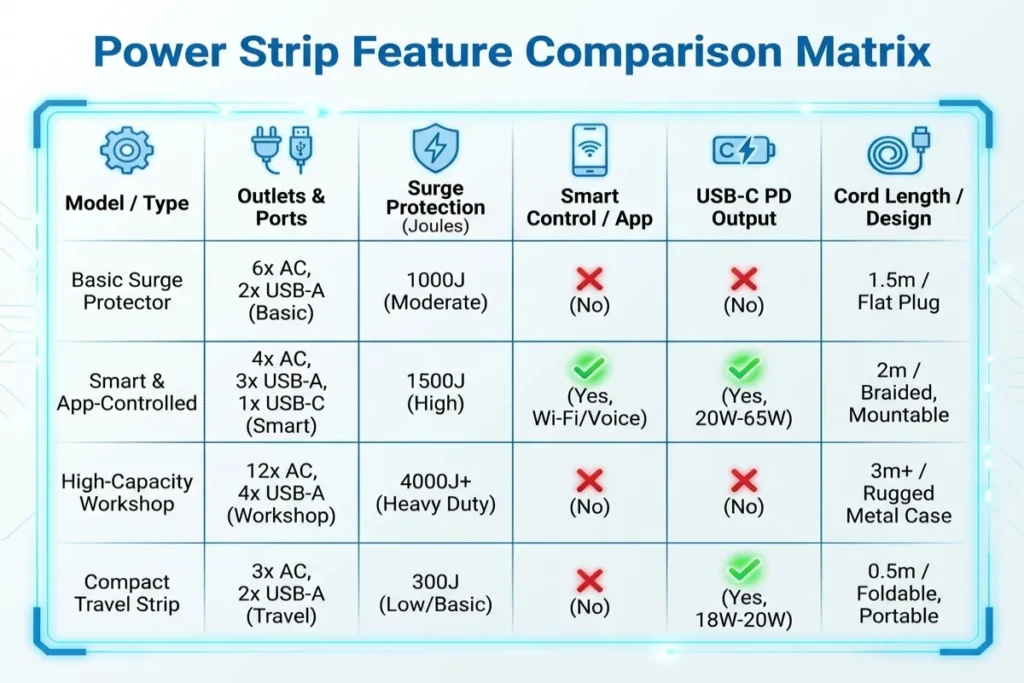
Power Strip Feature Comparison Matrix
Compare key performance characteristics across common designs to determine the right unit for your hardware setup:
| Design Type | Joule Protection Rating | USB Power Delivery Output | Max AC Outlets | Ideal Application |
| Desk-Clamp Station | 1,000 to 2,000 Joules | Dual 65W–100W USB-C PD | 3 to 5 Outlets | Standing desks, executive home offices |
| Home Theater Bar | 3,500 to 4,500+ Joules | Standard 15W USB-A/C | 8 to 12 Wide Outlets | OLED TVs, AV receivers, soundbars, consoles |
| Heavy-Duty Metal Workshop | 0 to 900 Joules (Focus on Circuit Break) | N/A (AC Heavy Focus) | 6 to 16 Outlets | Garages, workshops, power tools, server racks |
| Slim Travel / Compact | 300 to 900 Joules | 30W–65W GaN Fast USB-C | 2 to 4 Outlets | Travel bags, bedside nightstands, dorms |
Interactive Power Strip Selection Calculator
Calculate your total electrical load, total wattage draw, and surge protection requirements to find the ideal power bar using our interactive tool below.
Critical Electrical Safety Rules to Avoid Fires
Using multi-outlet equipment incorrectly poses serious fire hazards. Always follow these core safety rules:
+-------------------------------------------------------------------------+
|                     CRITICAL POWER STRIP SAFETY RULES                   |
|                                                                         |
|   [ RULE 1: NO DAISY-CHAINING ]                                         |
|   NEVER plug a power strip into another power strip!                    |
|   Overloads wall receptacles and causes dangerous overheating.          |
|                                                                         |
|   [ RULE 2: CHECK CONTINUOUS AMPS ]                                     |
|   Standard household circuits max out at 15 Amps (1800 Watts total).    |
|   Do NOT run space heaters + gaming PCs on the same strip.              |
|                                                                         |
|   [ RULE 3: UNCOIL EXTENSION CORDS ]                                    |
|   Never operate a power strip with its cord tightly bundled or coiled. |
|   Trapped magnetic induction creates extreme heat buildup.              |
+-------------------------------------------------------------------------+
1. The Danger of Daisy-Chaining
Plugging one expansion strip into another (known as daisy-chaining) is a major violation of National Electrical Code (NEC) guidelines. It tricks users into drawing more amperage than the primary wall outlet or lead cord can handle, leading to melt-downs and electrical fires.
2. Space Heaters and High-Draw Appliances
High-wattage heat-generating appliances—such as space heaters, toaster ovens, microwaves, and portable air conditioners—draw high continuous amperage (often 1,200W–1,500W alone). Always plug high-draw appliances directly into a dedicated wall outlet, never into a shared power bar.
5 Practical Tips for Building a Clean Power Setup
Follow these practical steps to build an efficient, safe power distribution system:
- Space Out Bulky Transformers: Select a bar with widely spaced “transformer outlets” along the outer edges so oversized wall-wart power adapters don’t block adjacent sockets.
- Mount Strips Under the Desk: Use integrated keyhole slots or heavy-duty mounting brackets to affix your power bar to the underside of your desk, keeping all floor cords out of sight.
- Opt for Integrated GaN USB-C Chargers: Choose units featuring built-in Gallium Nitride (GaN) USB-C power delivery (65W to 100W). This lets you fast-charge laptops and phones directly from the strip without bulky AC charging bricks.
- Label Cords at the Plug: Use color-coded labels or cable tags near the plug heads. When you need to unplug your router, you won’t accidentally kill power to your PC while working.
- Replace Old Strips Every 3 to 5 Years: MOV surge elements wear down over time from electrical noise. Replace primary surge units every few years to maintain active protection for expensive electronics.
Elevate Your Workspace with The Tek World
Choosing the right Power Strip is an essential step toward building a safe, organized, high-performance home office or entertainment space. By matching surge absorption joules, cord lengths, and USB charging specs to your hardware, you protect your valuable electronics while eliminating cord clutter once and for all.
Looking for comprehensive reviews on top-rated surge protectors, desk-clamp power stations, smart outlets, and standing desk wire management gear updated for 2026? Visit thetekworld.com for expert buying advice, hardware breakdowns, and workspace optimization guides!
Frequently Asked Questions (FAQ)
1. How do I know if my surge protector power strip is still protecting my devices?
Check the diagnostic LED indicators on the housing of your unit. A solid green or blue light next to “Protected” indicates active surge suppression. If this light is unlit, dark, or glowing red, internal MOVs have worn out from absorbing voltage spikes, meaning the unit functions only as a basic electrical bar and should be replaced.
2. Can I use a power strip with a 2-prong ungrounded outlet adapter?
It is strongly discouraged. Surge suppression relies on a functional ground wire to divert excess voltage away from electronics. Using a 3-prong to 2-prong cheater adapter disconnects the ground path, leaving your connected equipment unprotected against electrical surges.
3. What is the difference between 14 AWG and 12 AWG cord gauges on heavy-duty strips?
American Wire Gauge (AWG) measures copper wire thickness; counterintuitively, smaller numbers indicate thicker wire. A 14 AWG cord is standard for typical home office equipment (rated for 15 Amps), whereas a 12 AWG cord is thicker, heavier, and built for high-draw power tools or workshop machinery to prevent voltage drops over long cord runs.
4. What is vampire power draw, and how do smart power strips stop it?
Vampire power (or standby power) refers to electricity consumed by appliances even when turned off—such as gaming consoles, TVs, and speaker amps in standby mode. Smart power strips automatically cut supply to secondary outlets when the primary device is turned off, saving energy and lowering electric bills.
