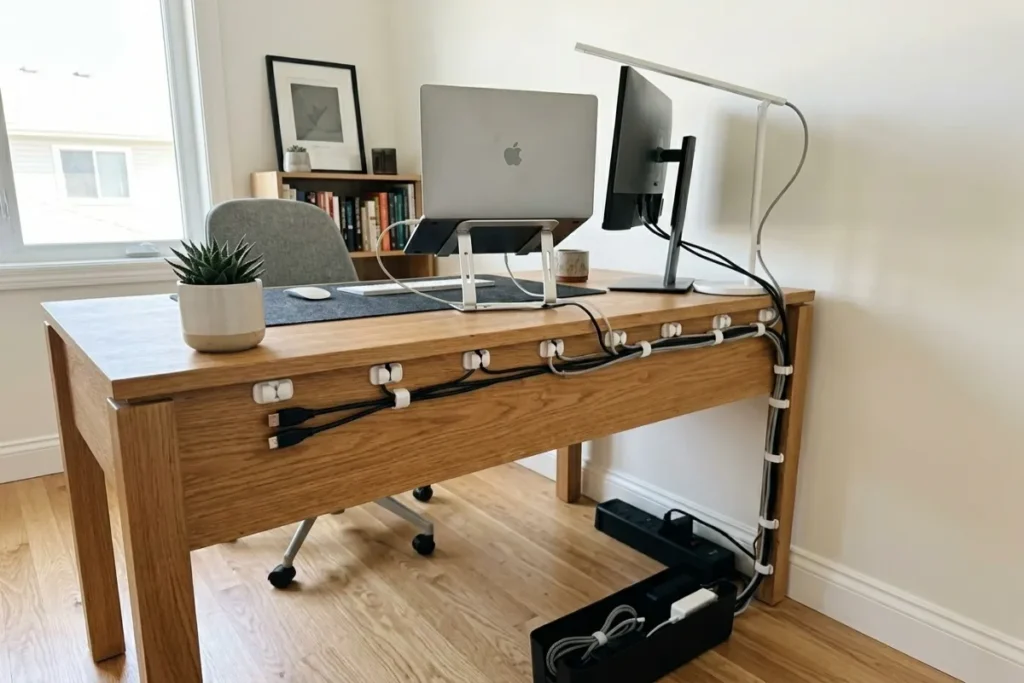
A cluttered desk with tangled wires can ruin the aesthetic of an otherwise perfect workspace and severely impact your productivity. Achieving that sleek, floating aesthetic—where every wire seems to disappear—isn’t magic; it just takes the right strategy.
Here at thetekworld.com, we are obsessed with helping you build the ultimate tech setup. Whether you are a hardcore gamer, a remote worker, or a minimalist, this cable management invisible paso a paso (step-by-step) guide will transform your space from a tangled nightmare to a pristine sanctuary.
How Does Cable Management Work?
At its core, cable management is the process of organizing, routing, and concealing the cords that connect your electronic devices. To make it “invisible,” you are essentially creating a hidden highway for your wires. Instead of cords dropping straight down from monitors and peripherals, they are routed along monitor arms, grouped together under the desk surface, and funneled through a single, concealed channel to the power source.
Your Paso a Paso (Step-by-Step) Guide
1.Unplug Everything:Start with a blank slate.
Disconnect every single device from the power strip and your PC. Untangle all the cords and lay them out on the floor. You cannot properly route cables if they are already fighting each other in a knot.
2.Mount Your Power Strip:Power placement is key.
Using heavy-duty double-sided mounting tape or screws, attach your surge protector directly to the underside of your desk. This prevents multiple cables from having to travel all the way to the floor.
3.Route Along Monitor Arms:Use your hardware.
If you use monitor arms, run the display and power cables through the built-in cable channels. If your arms don’t have channels, use zip ties or velcro straps to secure the wires tightly against the metal frame so they are hidden behind the stands.
4.Bundle the Peripherals:Group and conceal.
Gather the cables for your mouse, keyboard, webcam, and speakers. Use a cable sleeve or spiral wrap to bundle them into one thick, neat tube rather than five messy strings. Route this bundle under the desk toward your mounted power strip.
5.Use a Cable Management Tray:Zero gravity.
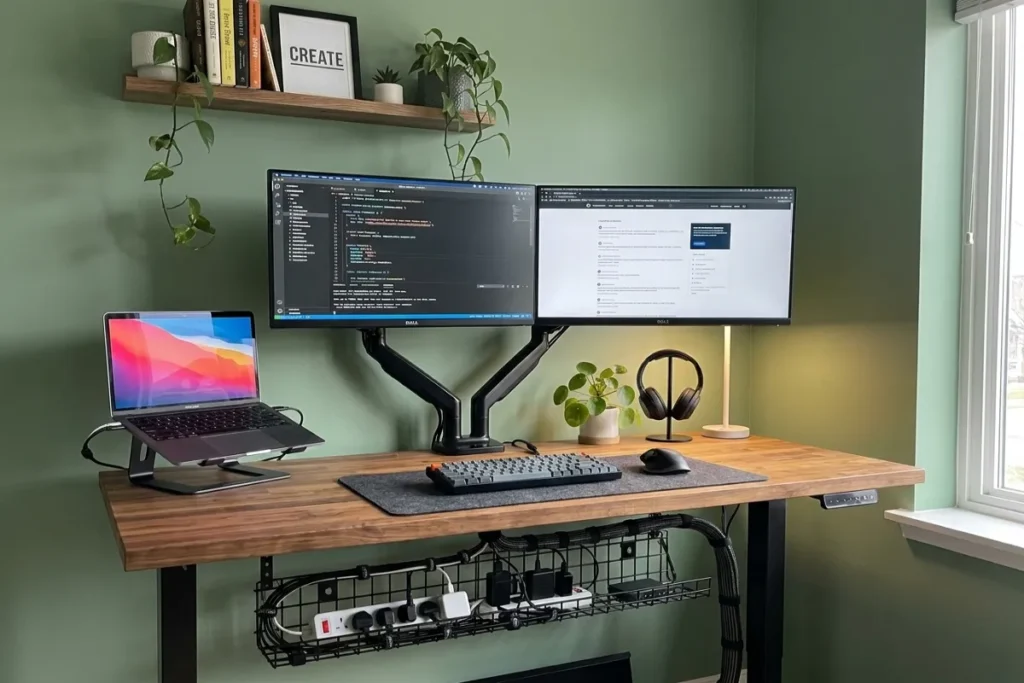
Install an under-desk cable tray or raceway. Tuck the bundled cables, power adapters, and any excess slack into this tray. The goal is to keep everything suspended tightly against the bottom of the desktop.
What is the Best Solution for Cable Management Under a Desk?
The absolute best solution for under-desk cable management is a J-Channel Raceway combined with a mounted power strip.
Raceways are rigid plastic or metal channels that screw or adhere to the underside of your desk. Unlike simple clips that just hold a wire in place, a wide tray or raceway physically hides power bricks, excess wire slack, and USB hubs from view. When paired with a cable sleeve (for the single wire run going from the desk down to the wall outlet), you achieve a 100% invisible look.
What Are the Common Cable Management Mistakes?
Even veterans make mistakes when trying to hide their wires. Avoid these common pitfalls:
- Using Zip Ties Instead of Velcro: Zip ties are permanent and can easily pinch or sever delicate cables if pulled too tightly. When you need to swap a mouse or keyboard later, cutting zip ties is a hassle. Always use reusable Velcro straps.
- Forgetting Cable Slack: If you use a standing desk, failing to leave enough slack in your main power line will result in cables violently ripping out of the wall when you raise the desk to a standing position.
- Routing Power and Audio Together: Running unshielded audio cables parallel to thick power cables can sometimes cause electromagnetic interference, leading to an annoying static buzz in your headphones or speakers.
Frequently Asked Questions (FAQ)
What are the best tips for cable management?
The best tips include investing in wireless peripherals (mouse, keyboard, headset) to eliminate cables at the source, using a monitor arm with built-in routing, mounting your power strip under the desk, and using reusable Velcro ties instead of single-use plastic zip ties.
What are the common cable management mistakes?
The most common mistakes are failing to plan the route before plugging things in, using zip ties that make future upgrades difficult, leaving too little slack for sit-stand desks, and letting power bricks hang under their own weight rather than securing them to the desk.
How does cable management work?
Cable management works by consolidating multiple hanging wires into single, organized bundles and routing them out of sight. It utilizes channels, trays, and ties to guide cables along the natural hardware of your desk (like the legs or underside) so they become practically invisible to anyone looking at the setup.
What is the best solution for cable management under a desk?
The best under-desk solution is a metal or sturdy plastic cable management tray (or J-Channel raceway). It provides enough physical space to hide thick power adapters and surge protectors, keeping all the mess elevated off the floor and hidden behind the desk’s lip.